How the Internet Works
The Internet is a worldwide, publicly accessible series of interconnected computer networks that transmit data by packet switching using the standard Internet Protocol (IP). It is a "network of networks" that consists of millions of smaller domestic, academic, business, and government networks, which together carry various information and services, such as electronic mail, online chat, file transfer, and the interlinked web pages and other resources of the World Wide Web (WWW).
Source:Wikipedia
Friday, 4 July 2008

Communication Protocols
The purpose of having protocols
The reason protocols are used is so there are standard rules in which everyone must follow that allow smooth transaction in whatever it is the protocol is used for, people for example have a protocol:
o Listen
o Don’t talk when someone else is
This is done so there is no conflict in the interaction between the two people, it works in the same way with internet protocols.
HTTP and HTTPS
Hypertext Transfer Protocol and Hypertext Transfer Protocol Secure is something that allows you to click things within the page, a link to a specific document or a link to play a video for example. HTTP is also the protocol that allowed easier transfer of data throughout the World Wide Web.
TCP And UDP
Transmission Control Protocol is a very reliable protocol, which means it is a good protocol to be used when emailing and transferring files which both need to be transferred safely as losing them could be a disaster. TCP is the transport protocol that manages the individual conversations between web servers and web clients. When using User Datagram Protocol, programs on networked computers can send short messages sometimes known as datagrams to one another, TCP is a more reliable protocol though.
IP
Internet Protocol provides is the service that gives each computer a unique code, a bit like a postcode, allowing computers to communicate with each other directly.
DNS
Domain Name System gives IP addresses “names”, www.google.com instead of 12.34.56.78; this is done to make things easier for the user because remembering a name of a website is much easier than remembering an IP address.
The reason protocols are used is so there are standard rules in which everyone must follow that allow smooth transaction in whatever it is the protocol is used for, people for example have a protocol:
o Listen
o Don’t talk when someone else is
This is done so there is no conflict in the interaction between the two people, it works in the same way with internet protocols.
HTTP and HTTPS
Hypertext Transfer Protocol and Hypertext Transfer Protocol Secure is something that allows you to click things within the page, a link to a specific document or a link to play a video for example. HTTP is also the protocol that allowed easier transfer of data throughout the World Wide Web.
TCP And UDP
Transmission Control Protocol is a very reliable protocol, which means it is a good protocol to be used when emailing and transferring files which both need to be transferred safely as losing them could be a disaster. TCP is the transport protocol that manages the individual conversations between web servers and web clients. When using User Datagram Protocol, programs on networked computers can send short messages sometimes known as datagrams to one another, TCP is a more reliable protocol though.
IP
Internet Protocol provides is the service that gives each computer a unique code, a bit like a postcode, allowing computers to communicate with each other directly.
DNS
Domain Name System gives IP addresses “names”, www.google.com instead of 12.34.56.78; this is done to make things easier for the user because remembering a name of a website is much easier than remembering an IP address.
Types of Networks
LAN
local area network – a small network usually within a building or home (workstation(PC, Mac etc.), servers, NIC, switch)
WAN
wide area network – a collection of multiple LANs; the internet for example (LAN’s joined by media(cable wireless etc.) (routers)
SAN
storage area network – same size as a LAN, it enable shared access to a hard drive (servers, switch, NIC)
PAN
personal area network – like a wireless LAN with a radius of around 10 metres, common uses are mobile phone and a Bluetooth headset
MAN
metropolitan area network – a network that covers a certain area, city wide (LAN’s joined by media(cable wireless etc.) (routers)
local area network – a small network usually within a building or home (workstation(PC, Mac etc.), servers, NIC, switch)
WAN
wide area network – a collection of multiple LANs; the internet for example (LAN’s joined by media(cable wireless etc.) (routers)
SAN
storage area network – same size as a LAN, it enable shared access to a hard drive (servers, switch, NIC)
PAN
personal area network – like a wireless LAN with a radius of around 10 metres, common uses are mobile phone and a Bluetooth headset
MAN
metropolitan area network – a network that covers a certain area, city wide (LAN’s joined by media(cable wireless etc.) (routers)
Wednesday, 2 July 2008
Wireless Vs Wired
Both wired and wireless networking have their own set of advantages, both are commonly used in home networking, the following is a list of advantages of both wired and wireless networking in the home;
Wired
Wired
- Speed - wired networking is a much faster option than wireless, wired networking is capable of reaching 1000Mbps, however this speed is only needed if you are bandwidth hungry, a serious gamer, graphic designer or someone that downloads large media files for example. If you are not one of these then 108Mbps will be enough for you, however, this speed could be achieved with wireless networking.
- Reliability - wired networking is not prone to interference, this can be a major downfall n wireless networks as the connections may have fluctuations.
- Security - when chosing between the two types of networks security may be a major factor, and the truth is wired networks are a much more secure option. Wireless networks are open to interuption by snoopers, this can be avoided if the network is correctly setup and various passwords are setup, but if you are not an avid computer user then setting it all up could be something you want to avoid.
Wireless
- Portablity - when using a wireless network you can access you computer/laptop/games console from virtually anywhere in the house, and if your signal is not strong enough then access points can be installed to boost the range of the signal, making it accessable.
- Cost Effective - setting up a simple wireless network in the home can be a much cheaper option than having a series of wired ethernet cables running all over the house.
- Safety - wireless is a much safer type of network as there will be no wired around the home to trip up on, no wires running under carpets and no need for holes to be drilled into walls to pass cables through.
Topologies
Bus Topology
A bus topology is the easiest topology to set up but has its problems, such as if the central cable has a problem it will stop the whole topology from working.

Star topology
A star topology links multiple computers together through a central device like a router or hub. These topologies are good because one computer can be disconnected but it wont affect the reset of the topology.

Ring Topology
Ring topologies are raerly used nowadays but are ar reliable and steady way to connect to a network, this is due to its way of transmitting the data, it passes both ways around the topology, they are used when reliablity is key, the stock exchange or a nuclear reactor for example.

Mesh Topology
Mesh toplogies are the best form of topologies as they have lots of choices on where they can send the data through in order to make sending the information faster and more reliable. The internet is the most common mesh topology, when recieving data from the internet it is sent through the best route in order to maintain speed and reliablity.

A bus topology is the easiest topology to set up but has its problems, such as if the central cable has a problem it will stop the whole topology from working.

Star topology
A star topology links multiple computers together through a central device like a router or hub. These topologies are good because one computer can be disconnected but it wont affect the reset of the topology.

Ring Topology
Ring topologies are raerly used nowadays but are ar reliable and steady way to connect to a network, this is due to its way of transmitting the data, it passes both ways around the topology, they are used when reliablity is key, the stock exchange or a nuclear reactor for example.

Mesh Topology
Mesh toplogies are the best form of topologies as they have lots of choices on where they can send the data through in order to make sending the information faster and more reliable. The internet is the most common mesh topology, when recieving data from the internet it is sent through the best route in order to maintain speed and reliablity.

Network Devices
Router
A common use for a router is when it's involved in a mesh topology, it then acts as a junction Point for the information to pass between. The router creates a pathway in order for the information to transmit through its neighbours, this also allows the router to remember it neighbours. The way most people use is routers is when they are connecting to the internet, to do this you will need an Ethernet cable and to log in to the router itself, although this is not always the case as the phone line will automatically connect you to the internet.
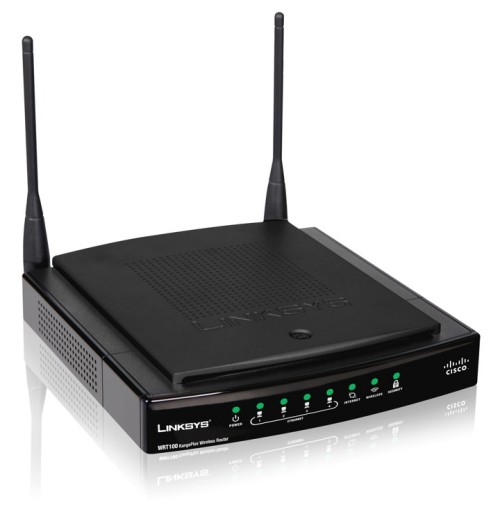
Hub
Hubs are dumb devices, unlike a router which is a smart device. A router floods the network with a signal and all PC’s connected to the hub will receive the signal. The fact it floods a signal to all devices means anyone could connect and listen in. Once someone is using the hub others on the network must wait for the hub to finish with the current PC before they can receive the information.

Bridge/Repeater
Bridges connect parts of a network together making it similar to a hub. They are used to boost the signal over long distances, but this means there is a chance of the data getting lost. Repeaters work in much the same way, boosting the signal if it doesn't reach the computer you need it to.

Wireless Access Point
A wireless access point boosts the wireless network range. It absorbs the signal from the wireless modem and retransmits it at a more powerful signal.

Switch
A switch is like a hub but a smarter version, a hub can only connect to one computer whereas a switch can connect to multiple computers at once.

Communication Services
Internet services
The internet has given us a source of unlimited resources, things such as; e-mail and file sharing, these two things we arguably couldn't live without. It has also given us various things which are more relevent to specific users rather than general internet users, things such as: remote access, this may be neccessary for specific people but in general it isn't a popular thing.
File Sharing
The ways to share files are most commonly LANs or through the internet, sometimes a network may be setup to share to people just on that network.
Remote Access
Remote access is a relativly new way to use a computer from another place, this is useful if you need files from a computer your not currently at.
Email
Email is electronic mail, a mailing system using the internet or LAN, it's used to send, recieve or store messages from other people anywhere in the world.
The internet has given us a source of unlimited resources, things such as; e-mail and file sharing, these two things we arguably couldn't live without. It has also given us various things which are more relevent to specific users rather than general internet users, things such as: remote access, this may be neccessary for specific people but in general it isn't a popular thing.
File Sharing
The ways to share files are most commonly LANs or through the internet, sometimes a network may be setup to share to people just on that network.
Remote Access
Remote access is a relativly new way to use a computer from another place, this is useful if you need files from a computer your not currently at.
Email is electronic mail, a mailing system using the internet or LAN, it's used to send, recieve or store messages from other people anywhere in the world.
Subscribe to:
Posts (Atom)